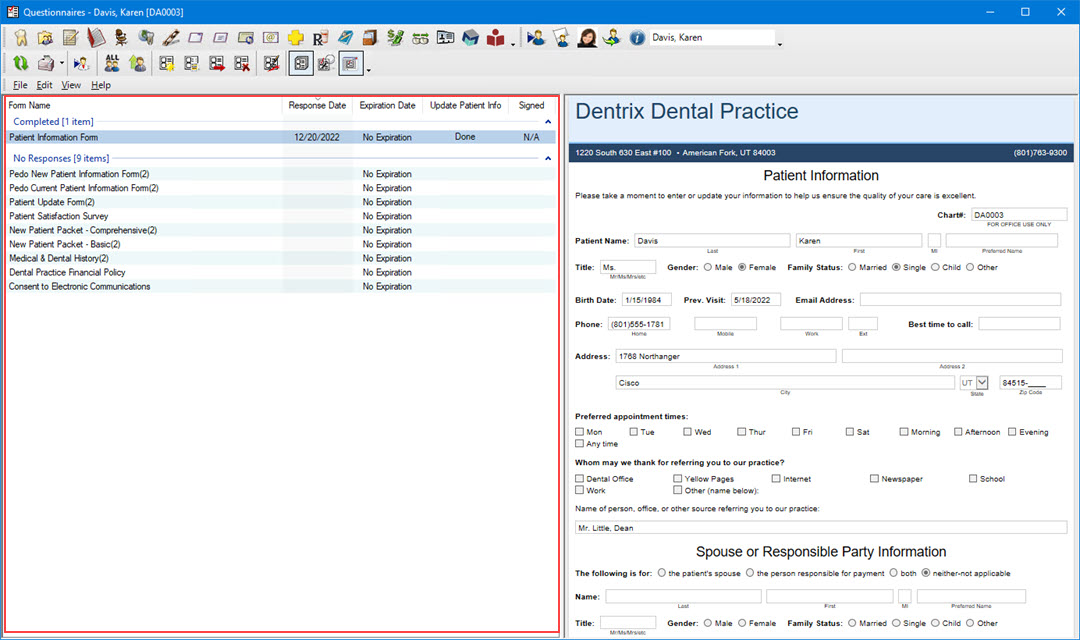
The Questionnaires List in the Questionnaires window lists questionnaire forms and is divided into the following eight columns:
Form Name - Indicates the name of the form.
Response Date - Displays the date the responses were entered for the form.
Expiration Date - Indicates when or if the form or questionnaire expires.
Update Patient Info - Indicates whether or not the patient information has been updated in the Family File. The column displays the following states:
Needed
Done
N/A
Signed - Indicates if the form requires a signature and if it has been signed. The column displays the following states:
Needed
Done
N/A
You can sort by column by clicking on the column heading. You can also re-size the columns in the list box.
The Questionnaires List is divided into two sections: Completed and No Response. The column and section names vary depending on whether you have a patient selected, have a provider or staff member selected, or do not have a patient or provider/staff member selected.